South Africa flag South African businesses: UK-quality hosting billed in Rand (ZAR) — your data stays in the UK, your invoice stays local. United Kingdom flag
EDZNET
  • Hosting
  • API
  • Domains
  • SSL
  • Bespoke Dev
  • Bespoke WP
  • QuickSite
  • Blog
  • Support
  • Login
  • 0
  • Get Hosting
  1. Home
  2. Knowledgebase
  3. CloudLinux (cPanel)
  4. How to Change the PHP Version via CloudLinux Selector in cPanel

  Categories

Backup/Restore
4
Cloudflare (cPanel)
9
CloudLinux (cPanel)
10
cPanel - Control Panel
25
Databases
11
DNS - Nameservers
6
Domain Management
10
Email
17
FTP
9
Mail Filters & SPAM
8
Mobile
11
Others
3
PayPal
7
Security
10
Security
2
SSL
5
WordPress
17

  Categories

  Tag Cloud

WAF Vulnerabilities Malware Scanner IP Reputation FIREWALL bitninja GreyList BalckList WhiteList cPanel WordPress WordPress Toolkit

  Support

My Support Tickets
Announcements
Knowledgebase
Downloads
Network Status
Open Ticket

How to Change the PHP Version via CloudLinux Selector in cPanel Print

  • 0


You can use CloudLinux's Select PHP Version to change your website's PHP Version. CloudLinux provides various PHP Versions to choose from.


1. Log in to your cPanel account.

2. In the Software section, click on Select PHP Version.

cP-CL-Select-PHP-Version-icon.gif


3. To the right side of the Current PHP version, click on the drop-down menu and choose the version you want to use.
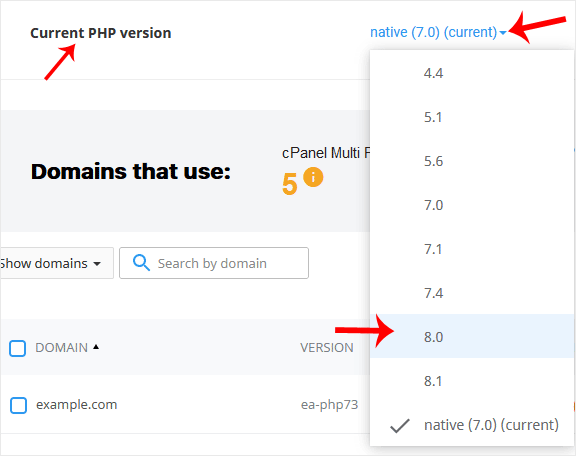
cP-CL-current-PHP-version-option.gif


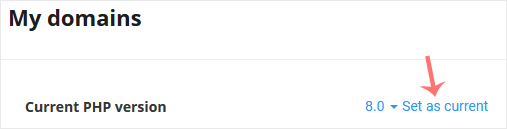
4. Click Set as current.

cl-set-as-PHP-version.gif


Was this answer helpful?

Related Articles

How to Increase PHP's upload_max_filesize Value Using CloudLinux Selector in cPanel   You can modify PHP's upload_max_filesize as per your needs using CloudLinux's PHP Selector in... How to Increase PHP's post_max_size Value Using CloudLinux's Selector in cPanel   You can modify PHP post_max_size as per your needs using CloudLinux PHP Selector in cPanel.... How to Enable or Disable PHP Extensions Using the CloudLinux Selector in cPanel   You can use CloudLinux Selector to enable or disable available PHP extensions in cPanel.... How to Enable or Disable PHP's allow_url_fopen Using CloudLinux Selector in cPanel   You can use CloudLinux Selector to enable or disable the allow_url_fopen directive in cPanel.... How to Enable or Disable PHP's display_errors via CloudLinux Selector in cPanel   Sometimes, we need to debug PHP. Hence, we need to enable display_errors or disable them for...
« Back

  Tag Cloud

WAF Vulnerabilities Malware Scanner IP Reputation FIREWALL bitninja GreyList BalckList WhiteList cPanel WordPress WordPress Toolkit

  Support

My Support Tickets
Announcements
Knowledgebase
Downloads
Network Status
Open Ticket
EDZNET

Premium managed UK hosting for businesses that can’t afford downtime. ISO/IEC 27001 data centres in London & Coventry. Serving UK and South African clients since 2019.

London Coventry

Services

  • Website Hosting
  • SSL Certificates
  • Domain Registration
  • Bespoke Development
  • Bespoke WordPress
  • QuickSite

Resources

  • Blog
  • Knowledgebase
  • API Guide
  • Network Status
  • Announcements
  • Affiliates

Company

  • Contact Us
  • Privacy Policy
  • Terms of Service
  • Cookie Policy
  • Acceptable Use
  • QuickSite Terms

UK Infrastructure

  • ISO/IEC 27001 facilities
  • Tier 3 data centres
  • 99.9% uptime SLA
  • UK GDPR & DPA 2018

Your IP: 216.73.216.252 US

All managed & shared hosting secured by BitNinja Server Security

Copyright © 2026 EDZNET. All Rights Reserved. England, Wales, Isle of Man & South Africa.

Made with and

EDZNET SUPPORT
Typically replies within minutes
👋 Hi there! Need help? Check our Quick Help guides first — or chat with us on WhatsApp. We're real developers, not bots.
Quick Help — Find instant answers Start Chat on WhatsApp

Loading...
Loading...

Choose Currency

R ZAR
£ GBP

Generate Password

Please enter a number between 8 and 64 for the password length